Kohler Energy Management
Discovery Energy, LLCHouse & Home
3.8143.00 Reviews
- Version
- 1.5.202606
- Installs
- 10.00K
- Age Rating
- Everyone
Screenshots
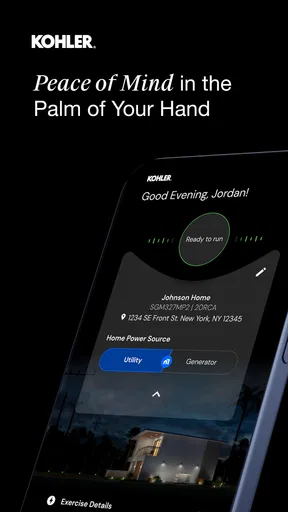
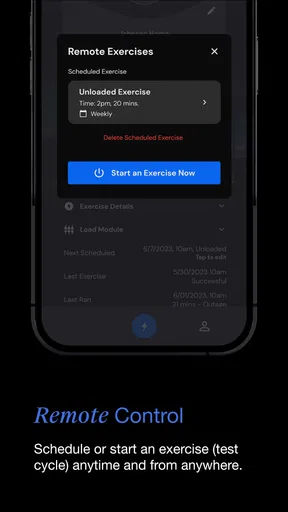
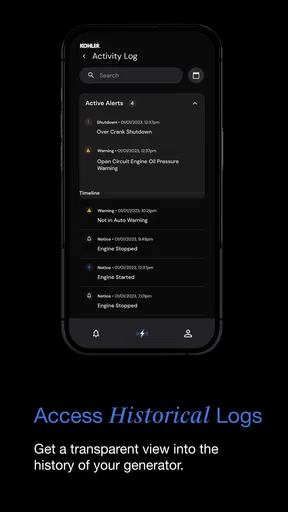
Our Review of Kohler Energy Management
 Analysis by Appyee
Managing a home generator is one of those jobs I would rather make routine than memorable. When the power goes out, I do not want to search through manuals, walk outside in bad weather, or wonder whether the equipment is ready. Kohler Energy Management is designed for that homeowner-focused situation: it is a free House & Home app from Discovery Energy, LLC that brings generator management into a mobile format.
My first impression is that its value depends less on how many functions appear on screen and more on whether your home already uses the equipment it is intended to manage. This is not a general smart-home dashboard, a utility-bill tracker, or a replacement for every generator control panel. It makes the most sense as a companion for a homeowner who wants a more convenient way to stay connected with a compatible Kohler energy setup.
The app is available for Android devices running at least Android 6.0, carries an Everyone content rating, and is free to install. Its current version is 1.5.202606. Those details make it approachable for households with older Android phones, although the practical experience will still depend on the generator installation, the phone, and the quality of the connection used by the system.
What I would consider before choosing it
I would weigh the app’s place in your routine before treating a convenient first check as a lasting reason to keep it. The key question is whether its generator-focused view makes a recurring task clearer than your existing controls, rather than simply adding another screen to remember. That distinction matters most once the novelty wears off and regular checks become the real test.
The first question is compatibility, not convenience
Before downloading, I would identify the exact generator and control equipment installed at home. The app’s purpose is homeowner generator management, so its usefulness is tied to the system it can actually communicate with. A polished mobile interface cannot compensate for an installation that is outside its intended ecosystem.
This is the most important decision point because many people use “generator app” as if it described one universal category. In practice, there is a difference between a manufacturer companion app, a whole-home energy platform, a remote monitoring service, and a generic smart-home tool. Kohler Energy Management belongs primarily to the first group. That focus can be a strength when the equipment matches, but it also means I would not choose it simply because I own any generator.
I would also separate two needs that are easy to confuse. If I want to check the state of a home generator from my phone, a dedicated manufacturer app is a logical place to start. If I want to compare household consumption, coordinate solar production, manage batteries, or build automations across several brands, I would look for a broader energy platform instead. The right choice depends on whether generator oversight is the main job or only one part of a larger home-energy project.
What I would want from a homeowner management app
For me, the useful test is whether the app reduces uncertainty before and during an outage. I want a clear sense of whether the generator is available, whether attention is needed, and whether I can check its situation without treating the equipment room as a daily destination. I also care about how quickly I can understand the screen when I am tired, traveling, or dealing with a storm.
That last point matters more than flashy design. A generator is an occasional-use product, which means I may forget how its controls work between emergencies. A companion app has a real advantage when it turns infrequent maintenance and status checks into something easier to remember. It is less valuable if it adds another complicated account, another confusing interface, or another place where I must interpret technical language without help.
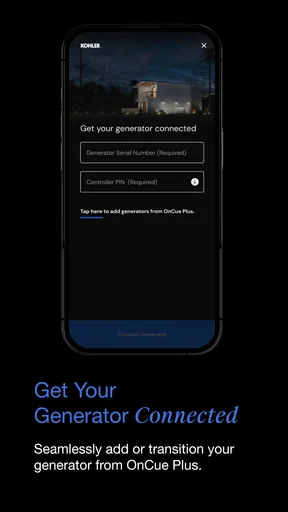
I would therefore judge this app by a simple routine: install it, connect it to the intended home equipment, review the main status information, and see whether I can understand what action is expected. If that sequence feels natural, the app can become part of seasonal preparation. If it leaves me unsure whether the problem is the generator, the connection, or the app itself, the convenience quickly fades.
A realistic everyday scenario
Imagine leaving home for a weekend while severe weather is expected. I would rather check the generator’s situation from my phone before driving away than ask a neighbor to inspect it. If the app gives me a useful view of the system, I can include that check in the same departure routine as locking doors and adjusting the thermostat.
Another practical situation is a short outage during the night. Instead of immediately going outside to inspect the generator, I can first use the mobile interface to understand whether the system appears to be operating as expected. That does not eliminate the need for professional service when something is wrong, but it can help me decide whether I am looking at a normal event or a reason to investigate further.
The less obvious benefit is preparation between outages. I would use the app during a quiet period, not only when the lights are already off. A quick check before storm season, after a long absence, or following scheduled service can expose a connection or setup issue while there is still time to address it. That is a better workflow than waiting for an emergency to discover that my phone and generator are not communicating.
Where the focused approach works well
The strongest case for Kohler Energy Management is a homeowner who wants a dedicated place for generator oversight rather than a collection of unrelated smart-home controls. A focused app can be easier to understand because its purpose is narrow. I do not have to sort through lighting scenes, cameras, locks, entertainment devices, and household routines just to reach the energy equipment.
This focus is also useful for family members who are not comfortable with generator hardware. A person who would never open an electrical panel may still be willing to check a phone screen. I would still treat the app as an information and management aid, not as permission to perform electrical work or bypass professional advice. The best result is better awareness, not unsafe experimentation.
Another advantage is continuity. When the app and the generator come from the same energy ecosystem, I can reasonably expect the mobile experience to be organized around that equipment rather than around generic terminology. That does not guarantee a perfect experience for every installation, but it gives the product a clearer purpose than a general-purpose monitoring tool.
Small habits that make it more useful
I would create a simple monthly habit: open the app, check the system, and note whether anything looks different from the last visit. This is not about staring at the dashboard every day. It is about making the application familiar before I need it. A tool I only open during a crisis is harder to evaluate and easier to misunderstand.
I would also keep the phone itself ready. That means using a device I regularly carry, keeping the app updated, and avoiding the assumption that a phone check replaces local controls or scheduled professional maintenance. The app is most useful when it sits inside a wider preparedness routine instead of becoming the only thing I trust.
A third tip is to decide in advance who in the household should use it. If only one person knows the login or understands the status screen, the benefit is limited when that person is away. Showing another household member the basic workflow can turn the app from a personal convenience into a practical backup.
Where another category may fit better
I would look beyond this app if my main goal were complete home-energy coordination. A household with solar panels, battery storage, electric-vehicle charging, smart thermostats, and several equipment brands may prefer a broader platform that combines consumption and production information. That kind of system may be better for planning energy use, while a generator companion remains better for equipment-specific oversight.
I would also consider a local control panel as the primary option if internet access is unreliable or if the people using the generator rarely carry smartphones. A mobile app is convenient, but convenience should not be confused with independence from the physical installation. If I need immediate access at home and do not want to manage accounts or connectivity, the traditional interface may be the more comfortable choice.
For a rental property, the decision becomes more complicated. A tenant may not control the generator installation, while an owner may need a process that can be handed between occupants or service professionals. In that case, I would first clarify who is responsible for monitoring and maintenance. The app may still help, but the ownership arrangement matters as much as the software.
People who own a non-Kohler generator should be especially cautious about assuming that a free download will solve their problem. I would not select this app as a generic remote-monitoring solution without confirming that the installed equipment belongs to the intended product family. A manufacturer-specific tool is usually a poor substitute for a compatible system.
The trade-off between simplicity and breadth
This is where my comparison becomes straightforward. A dedicated generator-management app can be easier to learn than a large energy platform because it has a narrower job. The trade-off is that it may not satisfy someone who wants one application for every energy device in the house. I would choose clarity over breadth when generator readiness is my priority, and breadth over specialization when I am building a multi-brand energy setup.
There is also a trade-off between mobile access and physical reassurance. Some homeowners will appreciate checking the system from another room or while away. Others will feel more confident seeing the equipment directly and using the controls they already know. Neither preference is wrong. The app is a better fit for the first group, especially when remote awareness reduces unnecessary trips outside.
The cost of switching from another method
Because the app is free, the financial barrier to trying it is low. The real cost of switching is time and attention. I would need to install it, understand the sign-in or setup process, connect it to the home system, and decide whether the information is clear enough to trust as part of my routine. If I already rely on a physical panel, the change is worthwhile only if the mobile access genuinely saves effort.
Someone moving from another generator app should expect a learning period even if the basic purpose feels familiar. The terminology, layout, and connection behavior may differ, and I would not remove an existing monitoring habit until the new workflow has proved dependable in normal conditions. Keeping the old reference materials nearby during setup is sensible, particularly for households where several people share responsibility.
The switching cost is higher for a home that already uses a broad energy-management platform. In that situation, adding a dedicated tool may create duplicate checks rather than simplify life. I would ask whether the Kohler-focused view provides information or control that the existing system does not. If it does not, the extra app may be unnecessary. If it offers a clearer equipment-specific view, using both can make sense, but only if each has a distinct role.
How the published reception affects my view
Kohler Energy Management has an average rating of 3.8 from around 255 ratings, with roughly 143 written reviews. I read that as a mixed but meaningful signal: enough people have tried it to form an opinion, yet the score does not suggest that every homeowner will have a smooth experience. For an app tied to physical equipment, ratings can reflect setup conditions, connectivity, and installation differences as much as the interface itself.
The app has passed the ten-thousand-install mark, which suggests it has reached a real group of homeowners rather than existing only as a niche experiment. I would still judge it against my own equipment and expectations. A moderate rating is not an automatic reason to avoid it, but it is a reminder to test the connection and daily workflow before depending on it during an outage.
Who should install it
I would recommend trying it to a homeowner with a compatible Kohler energy installation who wants a convenient mobile view of generator management. It is especially appealing if that person travels, has a second household member who needs simple access, or wants to include generator checks in a regular home-maintenance routine.
The free price and Everyone rating make it easy to consider for a household without worrying about an upfront app purchase. The Android requirement is also modest enough for many older devices. Still, I would use a phone that receives regular security updates and has a stable connection, because the age of the app requirement alone does not guarantee a good experience on every older handset.
I would skip it, or at least postpone installing it, if I do not have the compatible generator equipment, if I want full energy analytics across multiple brands, or if I am looking for a substitute for professional servicing. It is also not the right answer for someone who dislikes mobile account management and already feels comfortable using the local generator controls.
My final recommendation
After weighing the alternatives, I see Kohler Energy Management as a practical specialist rather than a universal home-energy solution. Its appeal comes from putting generator oversight closer to the homeowner’s normal phone routine. That can make preparation less intimidating and remote checks more convenient, provided the home system is compatible and the connection behaves reliably.
I would install it, complete the setup well before the next storm, and use it alongside—not instead of—the generator’s local controls, maintenance schedule, and professional support. My strongest recommendation is to test the app during a calm period and teach one other household member the basic workflow. That single step reveals whether it is genuinely useful in your home.
My bottom line: choose this free House & Home app when you want focused management for a compatible Kohler generator. Choose a broader energy platform when your priority is whole-home consumption and device coordination, or stay with local controls when simplicity and independence from mobile access matter more. For the right homeowner, Kohler Energy Management can turn an occasional, stressful responsibility into a more familiar routine. For everyone else, its narrow focus is precisely the reason to look elsewhere.
Verdict
Strengths of Kohler Energy Management
- Monitors household energy use from a single mobile dashboard.
- Helps identify high-consumption periods and potential savings.
- Can support smarter use of compatible Kohler energy equipment.
- Remote visibility is useful when managing a home backup system.
- Clean interface makes key energy information easy to find.
Limitations of Kohler Energy Management
- Requires compatible Kohler equipment for its main features.
- Some functions may depend on an internet connection.
- Initial setup can take time if several devices need pairing.
- Energy data may not update instantly in every situation.
- Limited usefulness for households without Kohler energy products.
Similar Picks in This Category
View All
Universal TV Remote Control
CodeMatics Media Solutions3.9

AlfredCamera Home Security app
Alfred Systems Inc.4.7

Planner 5D: AI Home Design
Planner 5D4.5

Universal Tv Remote-Cast to TV
One Music Player4.1

Zillow: Homes for Sale & Rent
Zillow Group4.8

99acres Buy/Rent/Sell Property
infoedge.com4.3
Frequently Asked Questions
What is Kohler Energy Management used for?
Kohler Energy Management is designed to help users monitor and manage compatible Kohler energy equipment, such as generators, batteries, and related power systems. Depending on the supported hardware and installation, the app may provide information about operating status, energy production or consumption, alerts, maintenance needs, and system performance from a mobile device.
Which devices and Kohler systems are compatible with the app?
Compatibility depends on the specific Kohler generator, energy storage system, controller, and installation configuration. Not every Kohler product can necessarily be connected to the application. Before downloading, users should check the app listing, equipment documentation, or Kohler’s official support resources to confirm that their model and controller are supported in their region.
Does Kohler Energy Management require an internet connection?
Most remote-monitoring features require an internet connection, normally through the connected energy system’s Wi-Fi, cellular service, or another supported network connection. Without connectivity, the app may not display current information or send remote notifications. Some locally available functions may continue to work, but capabilities can vary according to the equipment and controller configuration.
Can the app notify me about generator problems or maintenance?
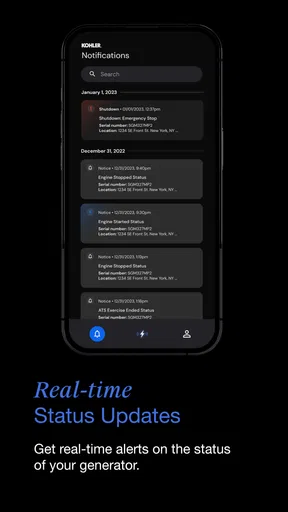
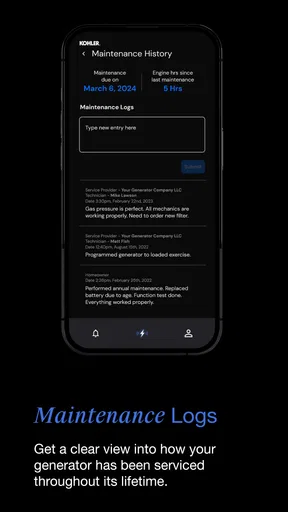
On compatible systems, Kohler Energy Management can provide alerts related to equipment status, warnings, faults, or scheduled maintenance. These notifications are useful for identifying potential issues before they become more serious, but they should not replace professional inspection or emergency procedures. Users should always follow the generator’s manual and contact an authorized technician when necessary.
Is Kohler Energy Management free to download and use?
The application may be available to download without an upfront charge, but access to certain monitoring services can depend on the connected Kohler equipment, installation package, account requirements, communication service, or regional availability. Before relying on the app, review the current store listing and service terms to understand whether subscriptions, professional installation, or additional connectivity costs apply.
